
One of the biggest challenges when migrating a production database is minimizing the downtime window for users. For critical systems, a shutdown of several hours is simply unacceptable.
This is where pgcopydb stands out by natively integrating a Change Data Capture (CDC) mechanism via its --follow option. This article explains how this continuous replication works and how to use it to achieve a near-zero downtime migration.
How Follow Mode Works
The --follow mode of pgcopydb relies on PostgreSQL’s logical replication. It keeps the target database synchronized with the source in real time, even during and after the initial data copy.
The process takes place in three key steps:
Step 1: Creating the replication slot and consistent snapshot
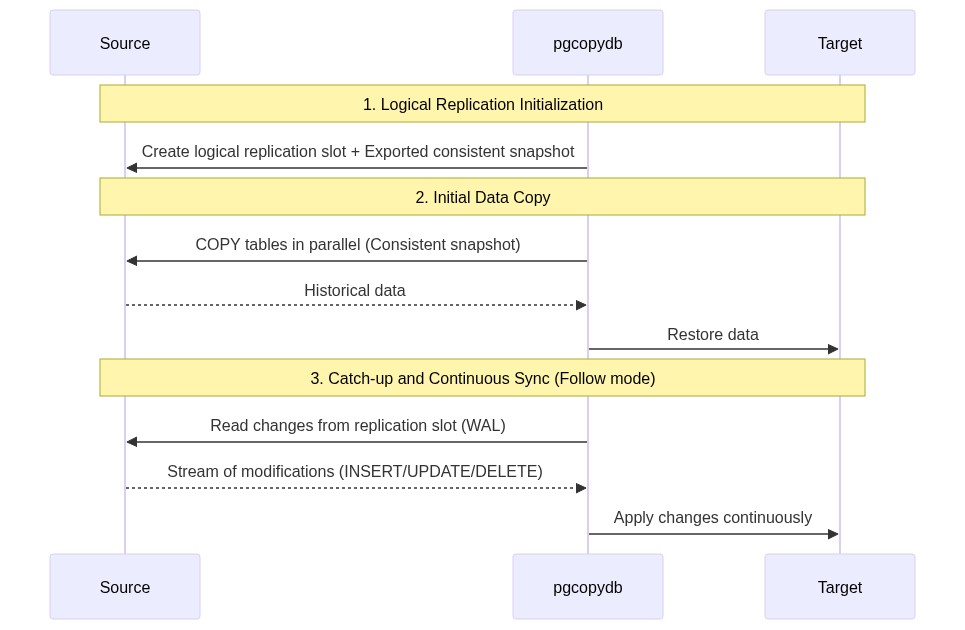
Before copying a single byte, pgcopydb creates a logical replication slot on the source server. This slot acts as a marker. PostgreSQL begins preserving all write changes (WAL – Write-Ahead Logs) that occur from this exact point forward.
Thanks to a shared transaction identifier (exported snapshot), the initial data copy is performed in a state that is perfectly consistent with the starting point of the replication slot.
Step 2: Initial Copy and Buffering
While pgcopydb copies historical data in parallel, write transactions continue to occur on the source database. The corresponding modifications are captured by the logical replication slot and stored temporarily in the source’s write-ahead log (WAL).
Step 3: Catch-up
Once the initial copy is complete and the indexes are rebuilt, pgcopydb switches to active replication mode. It consumes the changes accumulated in the replication slot and applies them to the target database. This catch-up phase continues until the target is synchronized within milliseconds of the source.
Key Commands for Live Migration
To run a complete migration with CDC, the main command is:
pgcopydb clone --follow
This command orchestrates the entire cycle:
1. Connects to the source and target databases.
2. Configures the logical replication slot.
3. Copies the schema and data, then rebuilds indexes.
4. Automatically switches to continuous replication mode.
The Switchover
Once the target is synchronized and the replication lag is close to zero:
1. Temporarily set the source application to read-only mode (or stop writes).
2. Wait a few seconds for pgcopydb to apply any remaining changes.
3. Stop the pgcopydb process.
4. Update your application connection strings to point to the new target database.
5. Open write access on the target.
Prerequisites and Best Practices
To ensure a successful migration with --follow, several configurations are required on the source server:
wal_level = logical: This parameter is mandatory in the source’spostgresql.confto enable logical decoding.- WAL Disk Space: Ensure there is sufficient disk space on the source. If the initial copy takes time and write activity is high, PostgreSQL will accumulate a significant volume of WAL files.
max_replication_slotsandmax_wal_senders: These parameters must be configured to allow at least one additional logical replication connection.- Final Cleanup: Don’t forget to stop pgcopydb cleanly at the end to destroy the logical replication slot created on the source. An active replication slot that is not consumed will eventually fill up the source’s disk.
Conclusion
pgcopydb‘s --follow mode democratizes live migrations by wrapping a complex technology (logical decoding) in a simple command-line utility. It is the ideal tool for migrating critical production databases to new physical servers, virtual machines, or cloud instances with minimal interruption.
Official Resources
- GitHub Repository: dimitri/pgcopydb
- Official Documentation: pgcopydb Documentation